There are a couple of ways to add buttons to your favorite Notion website builder.
## Notion’s “/button”
Type /button in Notion to create a standard button. This button can be linked to an external website or an internal page in Notion - which will be linked to corresponding page in Bullet.
## Bullet Button
Bullet has its own format for adding a button - enclose the link text with square brackets and add a link along with square brackets. This generates a link with the bullet-btn class, which can be customized differently across templates.
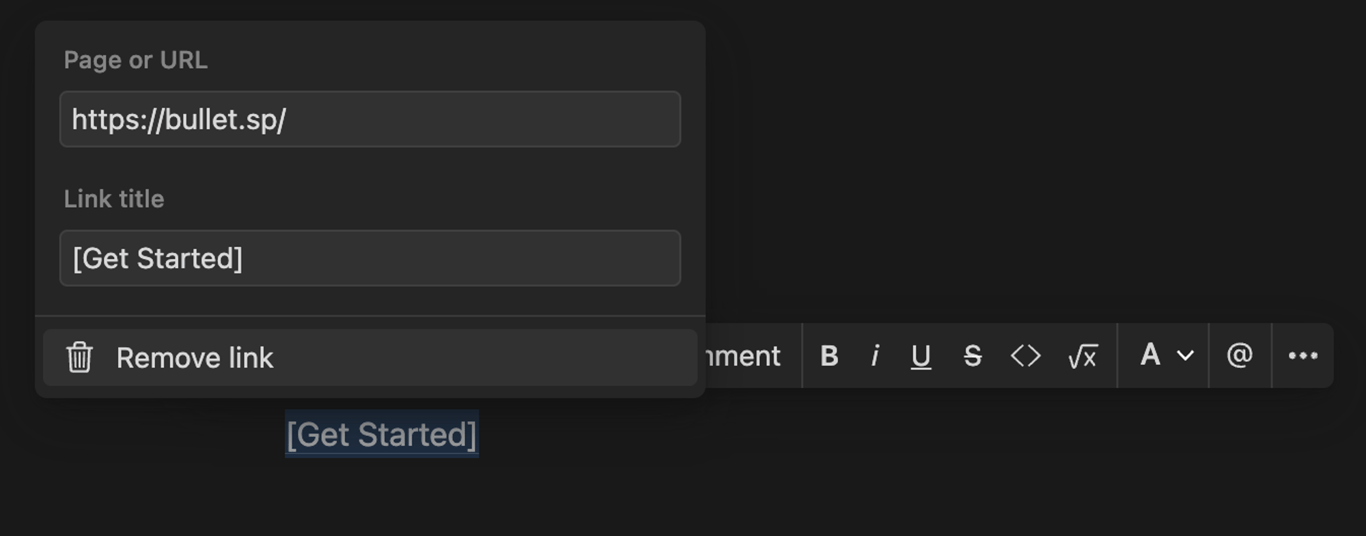
The link text enclosed in square brackets becomes a button.
> Note: Bullet only adds the bullet-btn class, and the style is managed in the templates. If you're not using our templates, you'll need to add custom CSS to make the link look like a button.
>
>
> Common Mistake: Sometimes, users find the button doesn't work because the square brackets should be part of the hyperlink, not outside it.
How to Add Buttons in the Notion website
There are a couple of ways to add buttons to your favorite Notion website builder.
Type /button in Notion to create a standard button. This button can be linked to an external website or an internal page in Notion - which will be linked to corresponding page in Bullet.
Bullet has its own format for adding a button - enclose the link text with square brackets and add a link along with square brackets. This generates a link with the bullet-btn class, which can be customized differently across templates.
The link text enclosed in square brackets becomes a button.
Note: Bullet only adds the bullet-btn class, and the style is managed in the templates. If you're not using our templates, you'll need to add custom CSS to make the link look like a button.
Common Mistake: Sometimes, users find the button doesn't work because the square brackets should be part of the hyperlink, not outside it.
Was this page helpful?
How can we improve?
Start typing to search documentation…
Pages
Ask AI assistant
AI Assistant
Sources cited
AI is thinking
Hi! I'm your AI assistant. Ask me anything about this documentation.
