You can add your custom domain, like [yourdomain.com](http://yourdomain.com/) or [blog.yourdomain.com](http://blog.yourdomain.com/), to your Bullet site by following the steps below.
1. Click on **“Site Setting”** and navigate to the domains section, and click on “Add Custom Domain”.
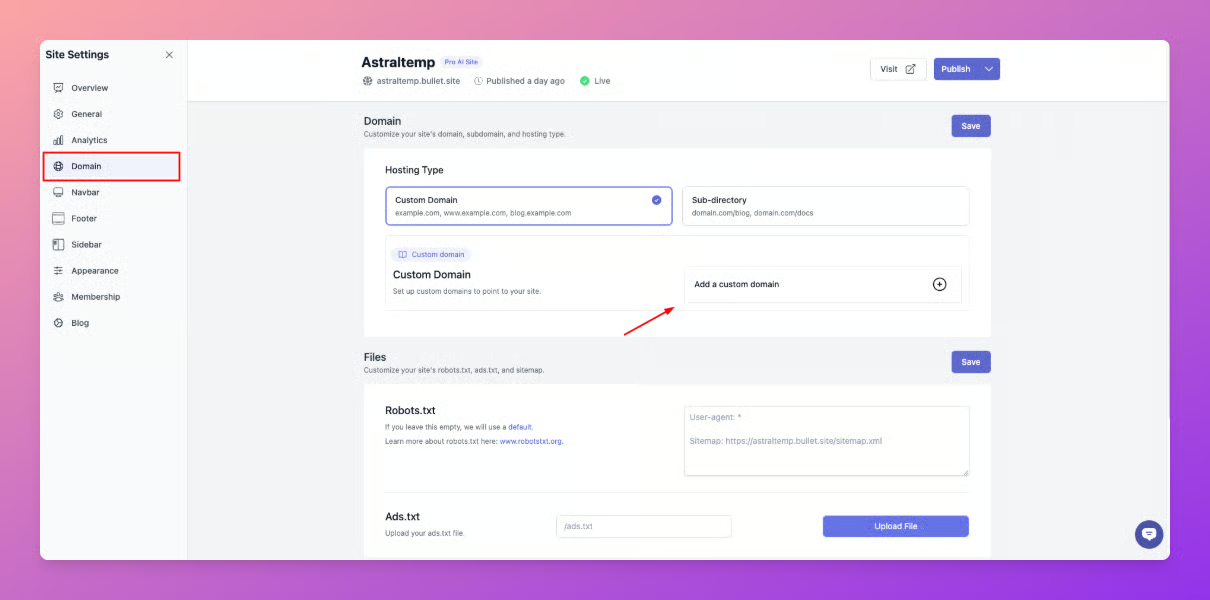
2. Next, in the pop-up that opens, enter the domain you want to connect to.
3. Now, copy & paste the CNAME records into your DNS settings by following the instructions provided. You will find the option to configure this in your domain registrar settings.
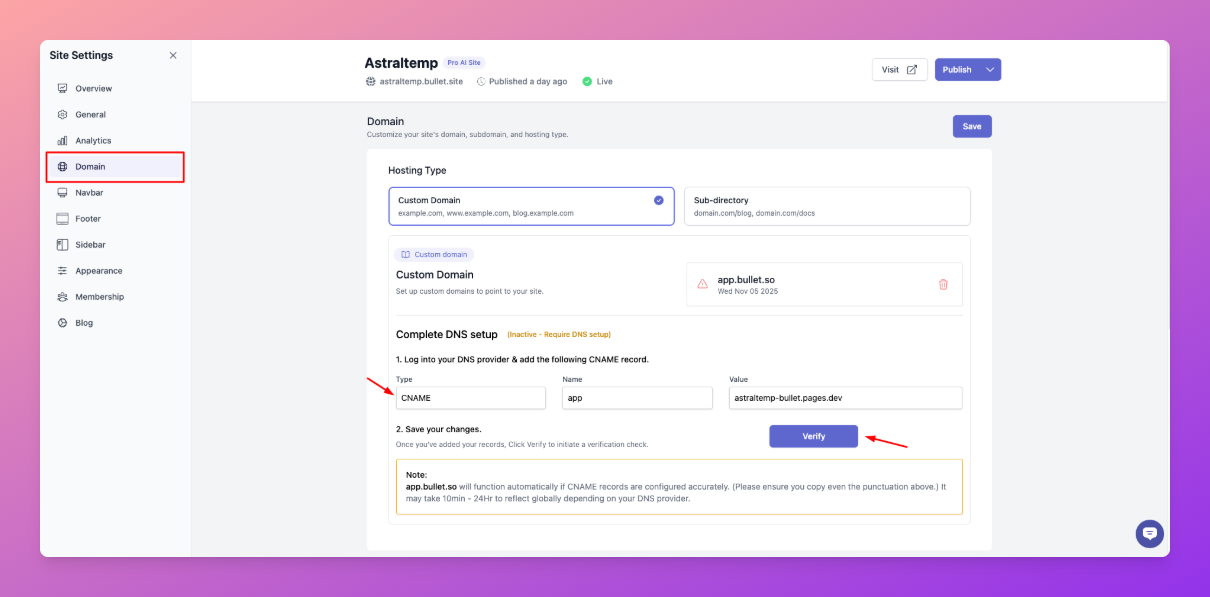
4. Once you add the CNAME records, click on the “verify” button to verify if the records are configured properly.
**Note**: It can take anywhere from 5 minutes to 24 hours for the changes to reflect based on your DNS provider.
---
## Legacy User
You can add your custom domain, like [yourdomain.com](http://yourdomain.com/) or [blog.yourdomain.com](http://blog.yourdomain.com/), to your Bullet site by following the steps below.
1. Click on **“Settings”** and navigate to the domains section, and click on “Add Custom Domain”.

2. Next, in the pop-up that opens, enter the domain you want to connect to.
3. Now, copy & paste the CNAME records into your DNS settings by following the instructions provided. You will find the option to configure this in your domain registrar settings.
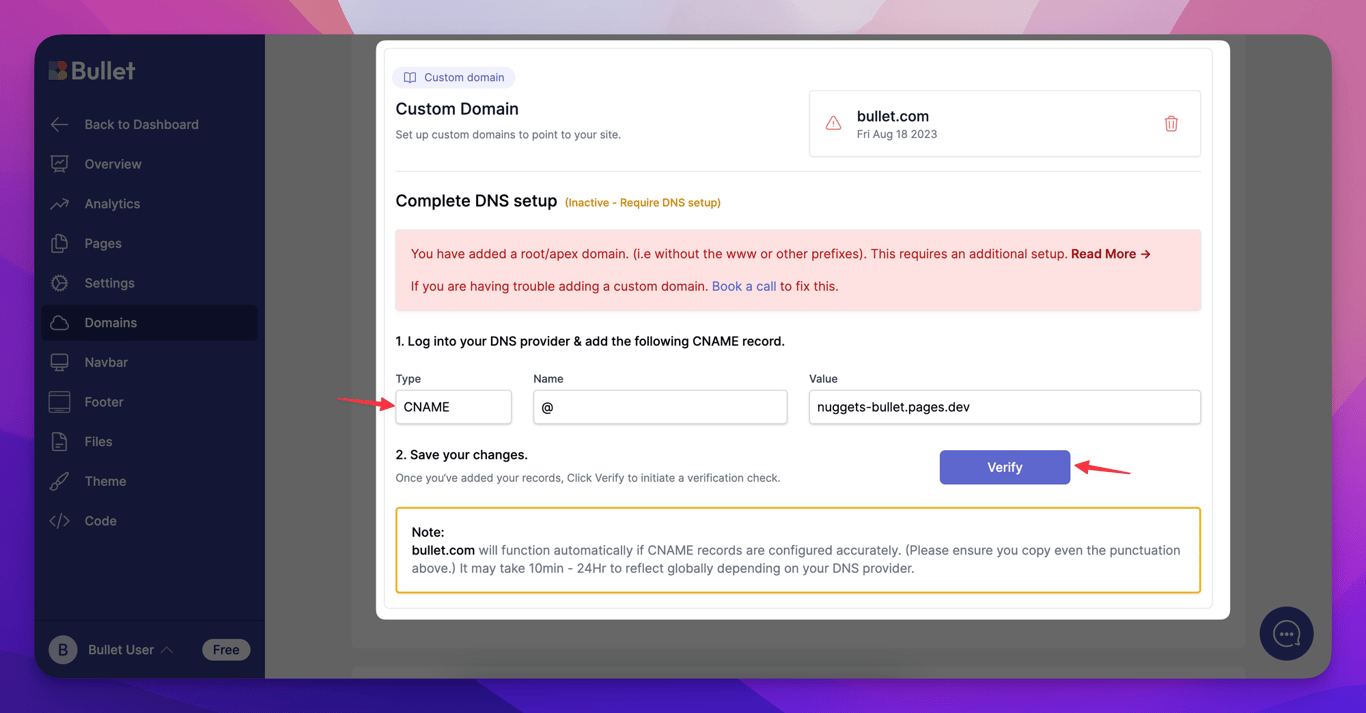
4. Once you add the CNAME records, click on the “verify” button to verify if the records are configured properly.
**Note**: It can take anywhere from 5 minutes to 24 hours for the changes to reflect based on your DNS provider.
Click on “Site Setting” and navigate to the domains section, and click on “Add Custom Domain”.
Next, in the pop-up that opens, enter the domain you want to connect to.
Now, copy & paste the CNAME records into your DNS settings by following the instructions provided. You will find the option to configure this in your domain registrar settings.
Once you add the CNAME records, click on the “verify” button to verify if the records are configured properly.
Note: It can take anywhere from 5 minutes to 24 hours for the changes to reflect based on your DNS provider.
Click on “Settings” and navigate to the domains section, and click on “Add Custom Domain”.
2. Next, in the pop-up that opens, enter the domain you want to connect to.
3. Now, copy & paste the CNAME records into your DNS settings by following the instructions provided. You will find the option to configure this in your domain registrar settings.
4. Once you add the CNAME records, click on the “verify” button to verify if the records are configured properly.
Note: It can take anywhere from 5 minutes to 24 hours for the changes to reflect based on your DNS provider.
Was this page helpful?
How can we improve?
Start typing to search documentation…
Pages
Ask AI assistant
AI Assistant
Sources cited
AI is thinking
Hi! I'm your AI assistant. Ask me anything about this documentation.



