How to's
Add a Carousel to Your Bullet Site
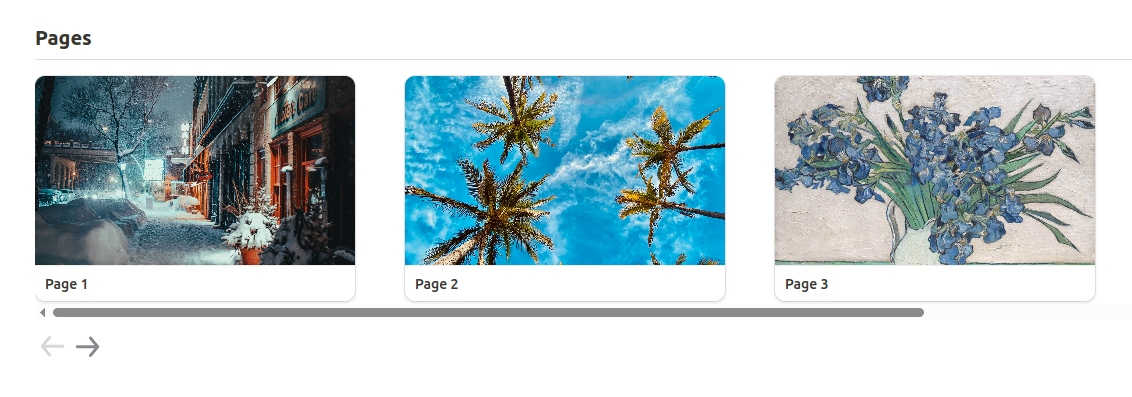
To create a scrollable carousel for a gallery view
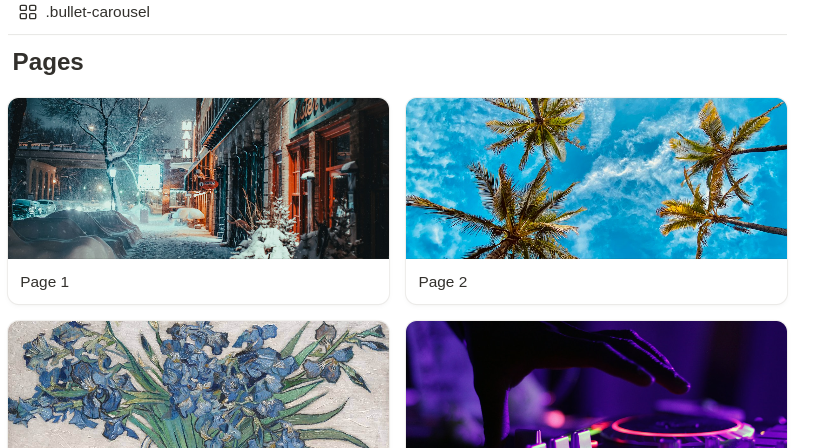
- Create a medium gallery view and name it.
.bullet-carousel
- If you don't want the cards to be clickable, add a
Publishproperty and uncheck it - To set up redirects, add a URL property named
bullet:Linkand insert your desired redirect URL
Add the carousel script
Navigate to the code section of your site in the Bullet dashboard. Copy the code below and paste it inside the “Body” section.
html
<script>

const ARROW_RIGHT_IMAGE = `<svg width="35" height="36" viewBox="0 0 35 32" fill="none" xmlns="http://www.w3.org/2000/svg">
<path d="M7.29167 19.243H24.5875L19.2937 25.6013C19.1712 25.7488 19.0789 25.919 19.0221 26.1021C18.9653 26.2852 18.9451 26.4778 18.9627 26.6687C18.9982 27.0543 19.1855 27.41 19.4833 27.6576C19.7811 27.9051 20.1651 28.0242 20.5507 27.9887C20.9363 27.9531 21.292 27.7658 21.5396 27.468L28.8313 18.718C28.8803 18.6484 28.9242 18.5753 28.9625 18.4993C28.9625 18.4263 29.0354 18.3826 29.0646 18.3097C29.1307 18.1425 29.1653 17.9645 29.1667 17.7847C29.1653 17.6049 29.1307 17.4269 29.0646 17.2597C29.0646 17.1868 28.9917 17.143 28.9625 17.0701C28.9242 16.994 28.8803 16.9209 28.8313 16.8513L21.5396 8.10133C21.4025 7.93671 21.2308 7.80433 21.0367 7.71359C20.8426 7.62285 20.6309 7.57599 20.4167 7.57633C20.0759 7.57567 19.7457 7.69434 19.4833 7.91175C19.3357 8.03418 19.2136 8.18453 19.1241 8.35421C19.0347 8.52388 18.9795 8.70953 18.9619 8.90054C18.9443 9.09155 18.9646 9.28416 19.0215 9.46733C19.0784 9.6505 19.171 9.82064 19.2937 9.968L24.5875 16.3263H7.29167C6.90489 16.3263 6.53396 16.48 6.26047 16.7535C5.98698 17.027 5.83333 17.3979 5.83333 17.7847C5.83333 18.1714 5.98698 18.5424 6.26047 18.8159C6.53396 19.0894 6.90489 19.243 7.29167 19.243Z" fill="currentColor"/>

</svg>`;

const SCROLL_AMOUNT = 350;

const toggleBtns = (collection, currentScroll, maxScroll) => {
    const prevButton = collection.querySelector(".carousel-btn-prev");
    const nextButton = collection.querySelector(".carousel-btn-next");
    prevButton.disabled = currentScroll <= 0;
    nextButton.disabled = currentScroll >= maxScroll;
};

const carouselCollections = Array.from(
    document.querySelectorAll(".notion-collection"),
).filter((el) => {
    const galleryView = el.querySelector(".bullet-carousel");
    return galleryView !== null || galleryView !== undefined;
});

const initCarousel = () => {
    Array.from(carouselCollections).forEach((collection) => {
        if (!collection) return;
        const galleryView = collection.querySelector(".notion-gallery-grid");
        galleryView.classList.add("db-bullet-carousel");

        const carouselFragment = document.createDocumentFragment();
        const carouselButtonContainer = document.createElement("div");
        carouselButtonContainer.classList.add("carousel-container");

        const prevButton = document.createElement("button");
        prevButton.classList.add("carousel-btn-prev");
        prevButton.innerHTML = ARROW_RIGHT_IMAGE;
        prevButton.style.transform = "rotate(180deg)";
        prevButton.disabled = true;
        prevButton.addEventListener("click", () => {
            scrollCarousel("left", collection);
        });

        const nextButton = document.createElement("button");
        nextButton.classList.add("carousel-btn-next");
        nextButton.innerHTML = ARROW_RIGHT_IMAGE;
        nextButton.style.marginTop = "7px";

        nextButton.addEventListener("click", () => {
            scrollCarousel("right", collection);
        });

        carouselButtonContainer.appendChild(prevButton);
        carouselButtonContainer.appendChild(nextButton);
        carouselFragment.appendChild(carouselButtonContainer);
        collection.appendChild(carouselFragment);
    });
};

const scrollCarousel = (direction, collection) => {
    const galleryGrid = collection.querySelector(".notion-gallery-grid");
    if (!galleryGrid) return;
    let currentScroll = galleryGrid.scrollLeft;
    const maxScroll = galleryGrid.scrollWidth - galleryGrid.clientWidth;
    const calculateTargetScroll = (
        direction,
        currentScroll,
        scrollAmount,
        maxScroll,
    ) => {

        if (direction === "right") {
            return Math.min(currentScroll + scrollAmount, maxScroll);
        } else {
            return Math.max(currentScroll - scrollAmount, 0);
        }
    };

    let targetScroll = calculateTargetScroll(
        direction,
        currentScroll,
        SCROLL_AMOUNT,
        maxScroll,
    );

    galleryGrid.scrollLeft = targetScroll;
    toggleBtns(collection, targetScroll, maxScroll);
};

const addScrollEvent = () => {
    carouselCollections.forEach((coll) => {
        const notionGalleryGrid = coll.querySelector(".notion-gallery-grid");

        if (notionGalleryGrid !== undefined) {

            const updateButtonsState = () => {
                const currentScroll = notionGalleryGrid.scrollLeft;
                const maxScroll = notionGalleryGrid.scrollWidth - notionGalleryGrid.clientWidth;
                const prevButton = document.querySelector('.carousel-btn-prev');
                const nextButton = document.querySelector('.carousel-btn-next');
                if (!prevButton || !nextButton) {
                    return;
                }
                prevButton.disabled = currentScroll <= 0;
                nextButton.disabled = currentScroll >= maxScroll;
            };
            notionGalleryGrid.addEventListener('scroll', updateButtonsState)
        }
    })
}

document.addEventListener("DOMContentLoaded", () => {
    initCarousel();
    addScrollEvent();
});

</script>
Next, add the carousel's CSS styling. Copy the following code and paste it into the “CSS” section.
css
:root {

    --card-width: 320px;

    --card-gap: 50px;

}

.db-bullet-carousel {
    width: auto;
    display: grid;
    grid-template-columns: repeat(auto-fill, minmax(var(--card-width), 1fr));
    grid-auto-flow: column;
    gap: var(--card-gap);
    overflow-x: auto;
}

.db-bullet-carousel .notion-collection-card {
    width: var(--card-width);
}

.coll-Carousel .notion-gallery-grid {
    transition: scroll-behavior 0.5s ease-in-out;
}

.carousel-btn-next,
.carousel-btn-prev {
    border: none;
    background: var(--bg-color);
    color: var(--navbar-btn-bg-color);
    opacity: 0.6;
}

.carousel-btn-next:hover,
.carousel-btn-prev:hover {
    opacity: 1;
}

.carousel-btn-prev:disabled,
.carousel-btn-next:disabled,
.carousel-btn-prev:disabled:hover,
.carousel-btn-next:disabled:hover {
    opacity: 0.2;
}

.notion-gallery-grid {
    scroll-behavior: smooth;
}
Output: