# **How to Embed HTML inside Notion**
You can use Notion code block to write any HTML inside Notion and render them in the webpage. You can use this to display any forms, images, newsletter signups etc.
To embed HTML inside Notion and render it on the webpage, you have to
1. Create a code block in Notion
2. Click on Caption
3. Add caption as "bullet:HTML". Bullet will automatically embed any HTML code inside this section in the specific part of the webpage.
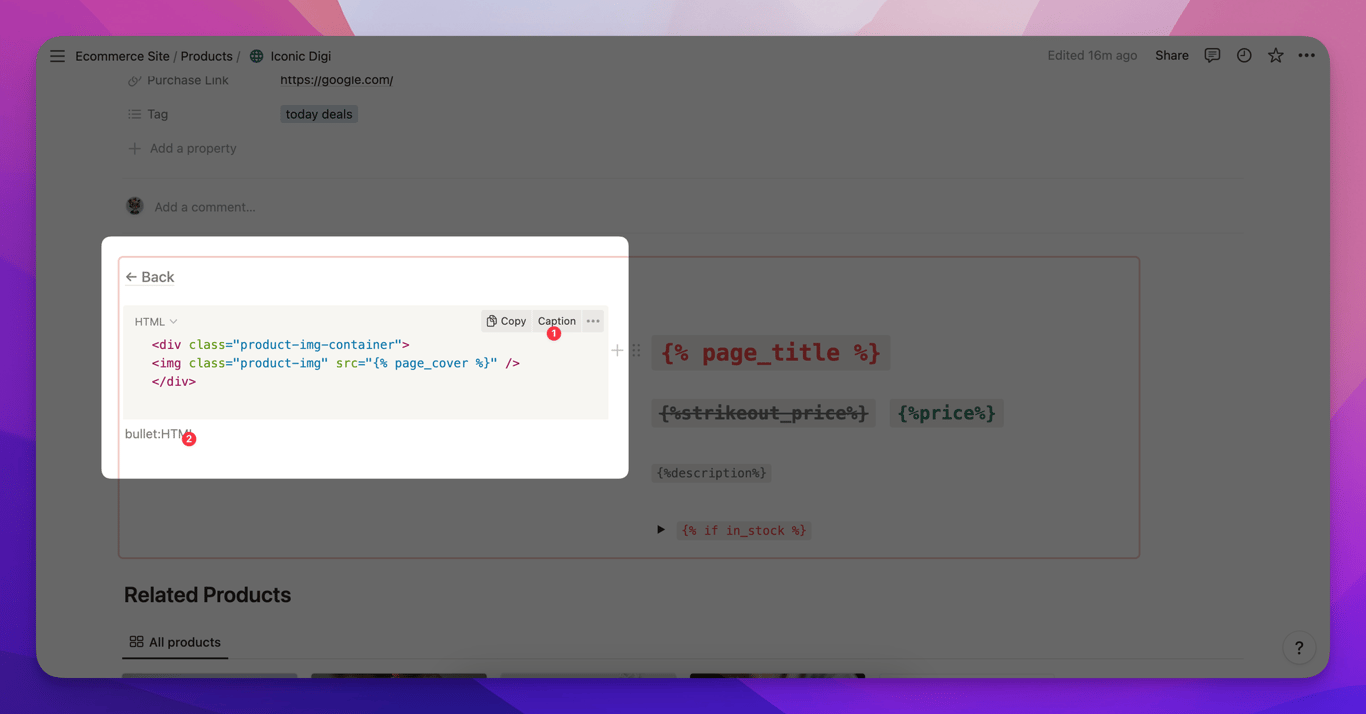
The above code utilizes a combination of custom HTML embed and merge tags. See how {% page\_cover %} is used inside the HTML img tag so that it renders page\_cover in the body of the website.
You can use Notion code block to write any HTML inside Notion and render them in the webpage. You can use this to display any forms, images, newsletter signups etc.
To embed HTML inside Notion and render it on the webpage, you have to
Create a code block in Notion
Click on Caption
Add caption as "bullet:HTML". Bullet will automatically embed any HTML code inside this section in the specific part of the webpage.
The above code utilizes a combination of custom HTML embed and merge tags. See how {% page_cover %} is used inside the HTML img tag so that it renders page_cover in the body of the website.
Was this page helpful?
How can we improve?
Start typing to search documentation…
Pages
Ask AI assistant
AI Assistant
Sources cited
AI is thinking
Hi! I'm your AI assistant. Ask me anything about this documentation.
