You can now hide any Notion blocks in the Bullet website (but still keep them visible in Notion). This includes shortcuts, unnecessary pages, and other items that you may wish to hide on your website.
To hide a page,
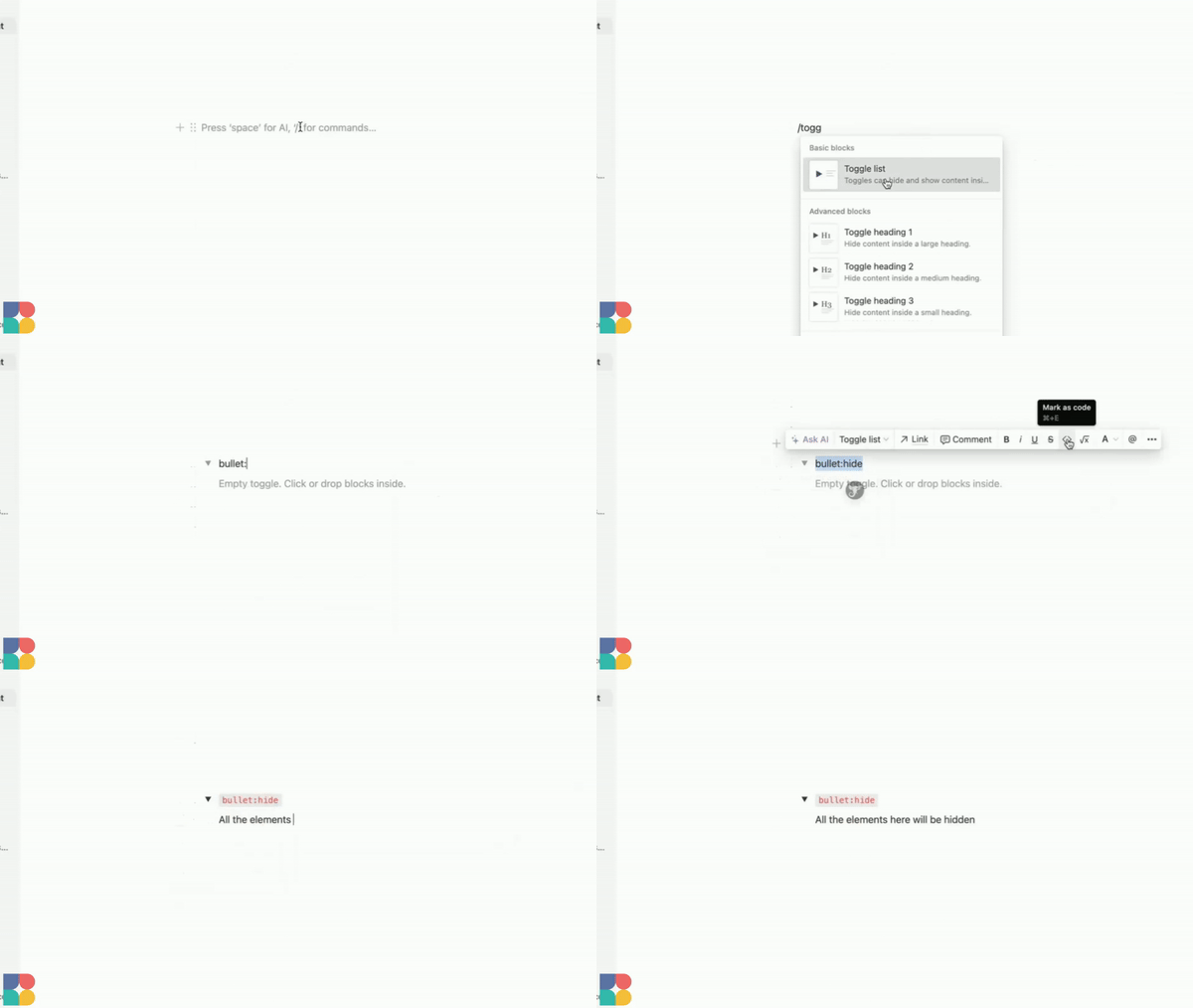
1. Create a Toggle Block in Notion.
2. Move all the elements that you want to hide inside the Toggle Block.
3. Once all the elements are inside the Toggle Block, change the toggle block heading to `bullet:hide`
4. After that, select the text and make it an inline code block.
[« How do merge tags work?](14189537) [Conditionally rendering blocks »](e38b2903)
Hiding Blocks in Bullet
You can now hide any Notion blocks in the Bullet website (but still keep them visible in Notion). This includes shortcuts, unnecessary pages, and other items that you may wish to hide on your website.
To hide a page,
Create a Toggle Block in Notion.
Move all the elements that you want to hide inside the Toggle Block.
Once all the elements are inside the Toggle Block, change the toggle block heading to bullet:hide
After that, select the text and make it an inline code block.
