Bullet now supports **automatic hreflang generation** for multilingual websites.
## How to enable it
1. Open your Notion page from the page list.
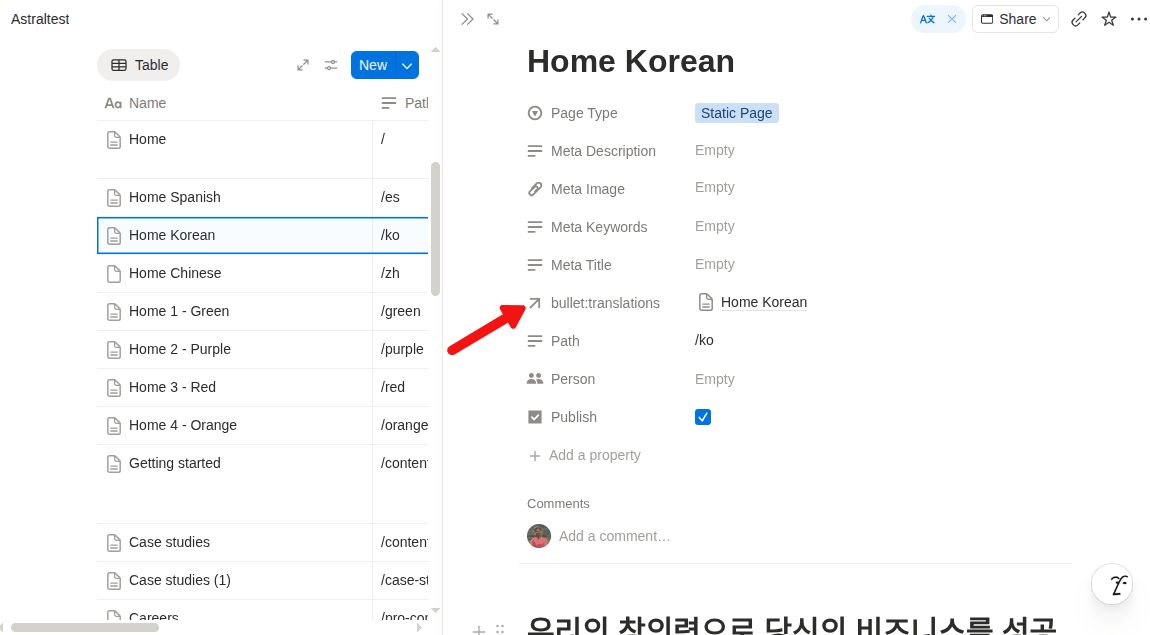
2. Add a new **Relation** property named `bullet:translations`.
3. Configure this relation to point to any** database**.
4. Open each page and, in the `bullet:translations` property, select and link its translated page
## What Bullet does automatically
Once the translated pages are linked and you publish your site, Bullet will automatically:
- Generate `<link rel="alternate" hreflang="...">` tags for each translated page
- Help search engines understand and index the correct language versions of your content
#### Important note
All translated pages must be linked together through the `bullet:translations` relation. Bullet uses this relation to identify which pages are translations of one another and generate the correct hreflang metadata automatically.
Hreflang Support
Bullet now supports automatic hreflang generation for multilingual websites.
All translated pages must be linked together through the bullet:translations relation. Bullet uses this relation to identify which pages are translations of one another and generate the correct hreflang metadata automatically.
Was this page helpful?
How can we improve?
Start typing to search documentation…
Pages
Ask AI assistant
AI Assistant
Sources cited
AI is thinking
Hi! I'm your AI assistant. Ask me anything about this documentation.
